
Hi Guys,
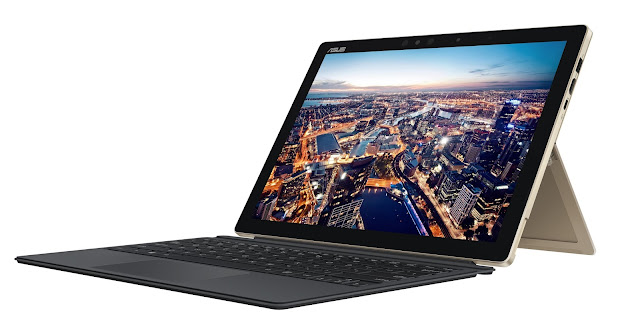
ASUS has announced the Transformer 3 Pro T303, the world’s most versatile PC. The Transformer 3 Pro is a premium 12.6-inch Windows 2-in-1 with unbelievable performance, amazing convenience and unrivaled expandability. It features four exclusive and powerful accessories that allow users to add functionality and performance: the ROG XG Station 2 external graphics dock for 4K UHD gaming and virtual-reality (VR) applications; immersive 5.1-channel virtual surround-sound with the ASUS Audio Pod; enhanced connectivity with the ASUS Universal Dock; and intuitive creativity using the ASUS Pen with its 1024 pressure levels.
Exquisitely styled in solid magnesium-aluminium alloy, with an incredibly thin 8.35mm tablet that weighs only 790g, Transformer 3 Pro is the perfect choice for discerning creators and professionals — or anyone who needs the ultimate take-anywhere versatility and power.

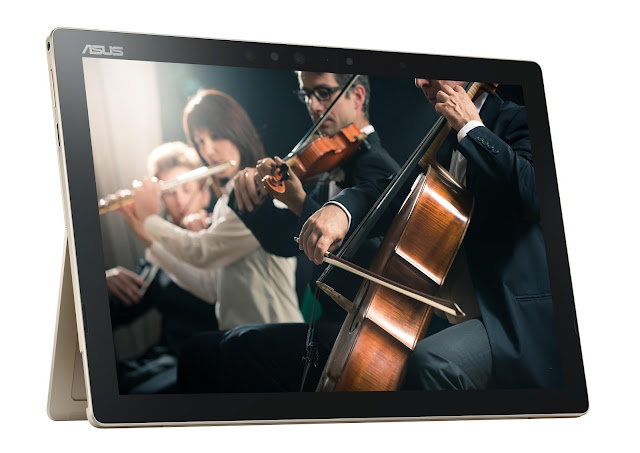
For superb on-the-go entertainment, Transformer 3 Pro is fitted with an ASUS SonicMaster Premium audio system, developed in conjunction with audio experts Harman Kardon, with powerful front-facing stereo speakers driven by smart amplifiers. These amplifiers use intelligent software algorithms to boost volume levels by 350% — compared to speakers of similar size and power driven by standard amplifiers — while minimizing distortion.
ASUS has announced the Transformer 3 Pro T303, the world’s most versatile PC. The Transformer 3 Pro is a premium 12.6-inch Windows 2-in-1 with unbelievable performance, amazing convenience and unrivaled expandability. It features four exclusive and powerful accessories that allow users to add functionality and performance: the ROG XG Station 2 external graphics dock for 4K UHD gaming and virtual-reality (VR) applications; immersive 5.1-channel virtual surround-sound with the ASUS Audio Pod; enhanced connectivity with the ASUS Universal Dock; and intuitive creativity using the ASUS Pen with its 1024 pressure levels.
Exquisitely styled in solid magnesium-aluminium alloy, with an incredibly thin 8.35mm tablet that weighs only 790g, Transformer 3 Pro is the perfect choice for discerning creators and professionals — or anyone who needs the ultimate take-anywhere versatility and power.

Transformer 3 Pro is an incredibly powerful 2-in-1, featuring an up to a 7th-generation Intel® Core™ i7 processor and 16GB of high-speed RAM, and an ultra-fast up to 1TB PCI Express® (PCIe®) x4 solid-state disk (SSD). Quiet and efficient cooling of the powerful processor is ensured by the revolutionary ThermoMaster Pro cooling system — a liquid-filled vapour-chamber cooling module that is just 0.5mm thin, plus a 3mm-thin cooling fan with ceramic bearings.
For on-the-go expansion and connectivity Transformer 3 Pro has not only a USB 3.0 Type-A port, full-size HDMI connector and a micro SD Card reader, but also the very latest USB 3.1 Gen 2 Type-C (USB-C) port with Thunderbolt™ 3 for 4K UHD display output, power delivery and up to 10Gbps data transfers via USB 3.1 or 40Gbps via Thunderbolt 3.
Transformer 3 Pro is the first model in the Transformer Series to feature the ultra-slim, magnetically-attached ASUS Transformer Cover Keyboard, which has a large Windows Precision Touchpad with support for Windows gestures. Transformer 3 Pro also has a stepless any-position kickstand that securely props the display at any angle up to an almost-horizontal 170°.

Transformer 3 Pro’s wide-viewing-angle, wide-colour-gamut display has a 3K (2880 by 1920) resolution, enhanced with ASUS TruVivid direct-bonding technology to reduce reflections and ASUS Tru2Life Video technology for clearer, sharper videos. For immersive entertainment, Transformer 3 Pro has a powerful Harmon Kardon stereo audio system, incorporating smart-amplifier technology for minimum distortion and maximum volume.
ASUS Audio Pod is a Bluetooth® wireless or wired speaker system with four powerful speakers that deliver 5.1-channel virtual surround-sound, making it the perfect companion for watching movies or listening to music on the go.
ASUS Audio Pod is a Bluetooth® wireless or wired speaker system with four powerful speakers that deliver 5.1-channel virtual surround-sound, making it the perfect companion for watching movies or listening to music on the go.
ASUS Pen is a high-precision active stylus with 1024 levels of pressure sensitivity to detect every nuance of movement. It allows users to point, write or draw accurately and offers a natural handwriting experience. ASUS Pen is compatible with wide range of software, from Microsoft OneNote® for serious note-taking, to professional-grade tools like SketchBook® for digital artists, illustrators and designers.
Despite its powerful specification, the power-efficient design of Transformer 3 Pro delivers all-day freedom. And when a recharge is needed, fast-charge technology allows the lithium-polymer battery to be topped up to 60% capacity in just 50 minutes.
Despite its powerful specification, the power-efficient design of Transformer 3 Pro delivers all-day freedom. And when a recharge is needed, fast-charge technology allows the lithium-polymer battery to be topped up to 60% capacity in just 50 minutes.
For superb on-the-go entertainment, Transformer 3 Pro is fitted with an ASUS SonicMaster Premium audio system, developed in conjunction with audio experts Harman Kardon, with powerful front-facing stereo speakers driven by smart amplifiers. These amplifiers use intelligent software algorithms to boost volume levels by 350% — compared to speakers of similar size and power driven by standard amplifiers — while minimizing distortion.

The ultra-slim ASUS Transformer Cover Keyboard attaches magnetically to allow instant mode-changing between laptop and tablet, and is gently backlit for perfect visibility in any environment. The generous 1.4mm key travel is longer than many slim mobile keyboards, giving a more comfortable laptop-like feel. The large glass-covered touchpad is extremely smooth to use and supports Windows Precision Touchpad features including multi-touch gestures for easy navigation and control.
Transformer 3 Pro has a 13MP rear camera, in addition to a front camera with infrared capability that supports Windows Hello biometric login. The front camera can recognize the user’s face in seconds and for instant and secure login. Cortana with Voice is the personal digital assistant that accepts voice commands. With Transformer 3 Pro’s array microphone, background noise is reduced so that voices are captured clearly from any direction, giving accurate voice recognition and recording.
ASUS Transformer 3 Pro T303 will be available from February 2017 in South Africa from leading online stores. Please contact your local ASUS representative for further information.
ASUS South Africa Facebook: https://www.facebook.com/ASUSza
ASUS South Africa Twitter: https://twitter.com/ASUS_za
Cheers!!!
Contact me at thelifesway@gmail.com if you want me to attend your launch events, blog and share on all my #socialmedia channels #TheLifesWay or to be a #Brand_Ambassador for your products and services!

