Showing posts with label Laptops. Show all posts

Monday, 20 December 2021

3 Reasons to Go For The #HUAWEIMateBookB Series for Commercial Usage @HuaweiZA

Hi Friends, 

Huawei doesn’t believe in compromise. It is possible, the international technology giant consistently proves, for devices to have it all: powerful technical capabilities, an easy and intuitive user experience, and beautiful aesthetics. The HUAWEI MateBook B Series, now available in South Africa, is no different.

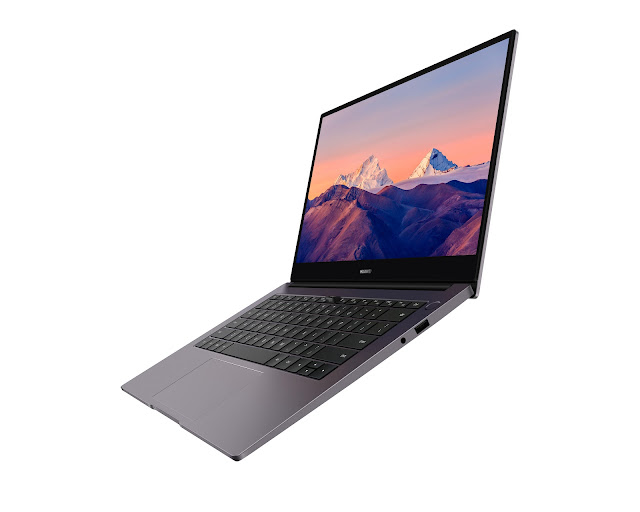
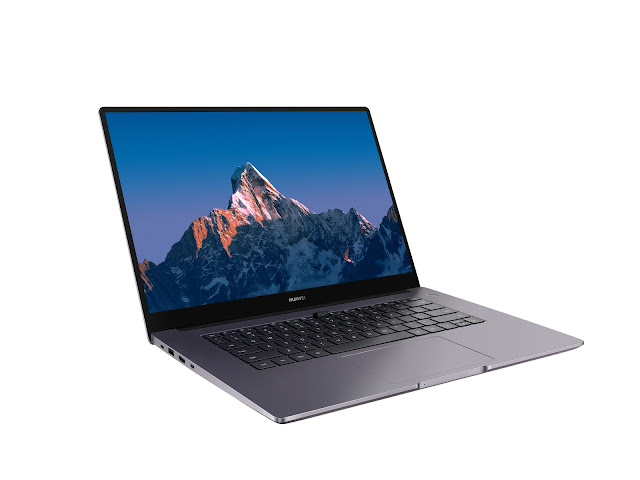
The new generation HUAWEI MateBook B Series includes the HUAWEI MateBook B7-410, B3-520 and B3-420. These new lightweight laptops are designed to support the needs of professional users across various industries and to meet the demands of an always-on, always-connected, remote working world.
3 Reasons to Go For The #HUAWEIMateBookB Series for Commercial Usage @HuaweiZA
Strong performance
The HUAWEI MateBook B Series comprises laptops that are ultra-slim, light and compact – and powerful, too. Inside, they boast an up to 11th Gen Intel® Core™ i7-1165G7 processor, capable of keeping up with the most stringent tasks you set for them. This new generation processor is manufactured with four cores and eight threads, making its performance 22% better than its predecessor and enabling it to handle resource-intensive apps with ease.

In the flagship HUAWEI MateBook B7-410, the processor is also integrated with Iris® Xe Graphics, which is meticulously calibrated by Intel. Rivalling entry-level discrete graphics cards, Iris® Xe Graphics enables the HUAWEI MateBook B7-410 to meet all your audio-visual needs.

All three laptops feature an NVMe PCIe SSD, which offers a higher read speed than the SATA SSD. This gives a remarkable boost in loading apps and files, ultimately delivering a smoother and faster performance.

To keep you on the go, powerful battery life and fast-charging support also come standard.
3 Reasons to Go For The #HUAWEIMateBookB Series for Commercial Usage @HuaweiZA
Seamless user experience
The new HUAWEI MateBook B Series is specifically designed to help professionals enjoy an all-scenario working experience. This means ensuring your working life is available to you no matter where you are or what device you’re using.

This is most obvious through Multi-screen Collaboration, which comes pre-installed on all HUAWEI MateBook B Series devices. Simply tap your Huawei smartphone against your laptop screen and enjoy all the benefits of having two devices on a single display. Working smarter, more efficiently and more productively has never been so easy.

With the HUAWEI MateBook B Series, there’s also exceptional business continuity support. All HUAWEI MateBook B Series devices are eligible for an up-to-five-year warranty that gives your business access to professional on-site repair services and a 24/7 technical support hotline. In the event of hard disk failure, Huawei will return your faulty hard disk, ensuring that your business retains full control over your data.
3 Reasons to Go For The #HUAWEIMateBookB Series for Commercial Usage @HuaweiZA
Desirable aesthetics
Of course, the HUAWEI MateBook B Series is just as impressive on the outside as it is on the inside.

The HUAWEI MateBook B7-410 features an ultra-lightweight unibody made of aerospace-grade aluminium. Weighing just 1.33kg, the laptop makes for an ideal companion for remote workers who are highly mobile. It also features a 13.9-inch 3K touch display with a screen-to-body ratio of 91%, offering an expansive viewing area on which to work.

The all-around HUAWEI MateBook B3-520 and B3-420 are lightweight and portable laptops that feature metal builds and minimalist designs. In addition to housing the MateBook-signature FullView Display, which offers an immersive viewing experience, they also boast the TÜV Rheinland certification for low blue light, which help to alleviate eye fatigue.

To ensure swift and seamless connectivity for everyone in your business, the HUAWEI MateBook B devices features a dual antenna high-speed Wi-Fi 6 connection. Coupled with a Wi-Fi 6 router, the laptop supports transfer speeds of up to 2.4Gbps, around 2.7 times faster than the rate of Wi-Fi 5, which lets users enjoy a fast yet stable internet surfing experience.

The HUAWEI MateBook B Series is the answer to every need posed by the business world – now and into the future. These laptops can be bought through Pinnacle and Mustek.

For more information, please contact the Pinnacle Huawei team at huawei@pinnacle.co.za or 011 265 3000, or the Mustek Huawei team at emyL@mustek.co.za or 011 237 1415. You can also visit www.mustek.co.za/huawei or https://www.pinnacle.co.za/huawei.

Cheers!!!
Support me if you like reading this blog post by buying me a cup of tea or coffee - https://www.buymeacoffee.com/TheLifesWay Contact at thelifesway@gmail.com to collaborate and promote your services and products. Subscribe to my YOUTUBE Channel for giveaways, product reviews and mystery unboxings. #TheLifesWay #9YearsofTheLifesWay. Namaste!

Monday, 6 April 2020

Top 8 Tips On For Working from Home #WesternDigital

Hi Friends, 

Technology is critical to helping people stay connected in a time when we are asked to keep social isolation. The better IT teams can make this transition successful, the more they can help employees feel empowered. Here are 8 tips from the IT team at Western Digital to yours.

As a precaution to the recent novel coronavirus, more and more companies and governments are either encouraging or have made work-from-home mandatory. IT teams are tasked with leading this transition across data systems, mobile computing devices, applications and new security challenges so employees can feel both connected and productive at home (both are not straightforward tasks).

We’ve gathered a few tips from our IT team here at Western Digital to help your workforce’s transition be more successful. Here are the top eight:

1) Don’t Wait – Start Today (Literally, Right Now)
Most companies today already have part of their workforce working from home, but it’s an entirely different scenario when hundreds, or thousands, of people are connecting remotely to virtual systems at the same time. If your company is still not encouraging working from home, or only partially, use the time now to prepare for the potential – a situation where most employees will need to access applications and data securely from remote locations. Being a step ahead with your data infrastructure, policies and documentation, will help ensure a smooth transition for your business at a critical time.

2) Test It Till You Break It
Test your systems to ensure performance, reliability and scalability. Test application and hardware infrastructure at maximum load; understand how many concurrent connections your VPN can support; send your entire IT team to work from home. Find out where the remote operations gaps are. It’s far better to see what breaks in a test scenario than when your company’s employees depend on it. So, learn in advance where the weak points are and fix them now.

3) Streamline the Muddle of Communication and Security Tools
There is a plethora of virtual meetings, chat, documentation, project and other management tools out there, and likely people are using more than one in your company today (whether authorized or not). This is the time to streamline the official tools employees should be using, ensuring these services can scale (you may need to review your SaaS contracts) and put documentation in place (accessible in a shared repository) on how to install and use them.
Top 8 Tips On For Working from Home #WesternDigital
4) Get Ready to Monitor With 24/7 Support
With any new situation you’ll need to closely monitor infrastructure to be able to respond to any shortfalls in real time. With employees using an all new technology setup, and many potentially veering from regular daytime working hours (think of those with children at home who will catch up on work late at night), expect to need to provide more IT support than usual, and at different hours of the day.

5) Establish Policies for Laptops, Services, and Peripherals
You’ll need to establish policies for how your company can support employees at home with everything from internet services, to computing devices, or peripherals. Some questions you should explore:
  • How many employees will require a laptop to work from home? How many can you provision?
  • Will the company pay for internet or phone services?
  • What if someone does not have internet services or needs to upgrade speed?
  • What’s the policy on ordering peripherals such as keyboards, monitors, headphone sets, etc.?
6) Create Practical Documentation (and Accessibility)
The more you can support and enable the remote workforce to use the proper tools, the more you can impact the productivity and morale of the business. Prepare with the right documentation to enable everyone to work better – both end users at home and your IT team. Make sure to have a clear place where employees can find how-to guides on installing all the applications and accessibility tools they need. Take a moment to also ensure you have documentation and account accessibility for all IT systems should a core team member be unavailable.
Top 8 Tips On For Working from Home #WesternDigital
7) Automate. Repeat.
Now is the time to explore what else can be automated in your IT workflows, particularly when it comes to IT tickets and support questions. You’ll be seeing a lot of similar support questions, and tools like AI-enabled chatbots have come a long way to ease the pressure off your team members for commonly asked questions. With working from home possibly an ongoing situation, IT may need to support the business in new channels and undertakings. Anything that can be automated will allow your team to focus on more complex tasks.

8) Set Up a Better Home Office, Together
Whether it’s tips on how to set up a dedicated workspace, to desk ergonomics, working from family-shared spaces, or how to set structured breaks to unplug– you’ll need to help your workforce feel productive and connected from home. Using multiple ways of communication – guides, chats, shared meetings – can not only help people find ways to be more efficient, but also set an example of how to stay better connected in a virtual environment. You can offer a virtual help desk to make communication feel personal, create online ‘rooms’ for water cooler chats, and simply get creative.

Technology is critical to helping people stay connected in a time where we are asked to keep social isolation. These abrupt changes are challenging for both IT infrastructure and employee morale. The better IT teams can make this transition successful the more they can help the workforce feel empowered, find new ways to bond and keep spirits up.

Namaste!!!
Contact Aashish Rai Jain at thelifesway@gmail.com or editor@thelifesway.com to send your products, launch event invites, and services to be consumed. #TheLifesWay #PhotoYatra #7YearsofTheLifesWay. Follow me on www.instagram.com/thelifesway for all travel-related photo posts. Namaste!

Monday, 9 July 2018

@AcerAfrica First to Market With @Intel Optane Memory #Swift3 Ultrabook @Makro_SA

Hi Friends, 

Acer Africa is proud to announce that its new Swift 3 will be the first to market with Intel Optane Technology, a truly disruptive memory technology design which has incomparable speed, density and non-volatility for faster processing. Acer has launched the Intel Optane Technology in its Swift 3 device to target users who want the performance of a very high-end device at an affordable price.

Being the first to market with this innovative technology provides Acer with the opportunity to offer the consumer advanced processing capabilities for heavy workloads. The Swift 3 Ultrabook, in an i5 and i7 (8th Generation) configuration, has been earmarked to enter the market with Optane as it is a stylish and luxurious device, made for the person looking for the ultimate in speed and processing power.

Intel Optane is a unique technology from Intel that uses advanced artificial intelligence to make your computer faster without having to spend a fortune on a computer with a bigger memory chip or larger storage access.

Intel Optane Technology combines a next generational non-volatile memory called 3D XPOINT Memory which eliminates the lag time your internal storage processor takes to administer large data sets. The simple and dense design enables Intel to deliver greater capacity than DRAM, a memory chip that relies on an applied voltage to keep stored data, in the same space.

Optane technology is especially useful for the demanding workload environments as it utilises low latency levels to boost memory performance, eliminating the performance penalty for each data request, making it suitable for all devices, applications and services. Optane Memory will also play a massive role in the move to Cloud Technology for businesses in the future.
@AcerAfrica First to Market With @Intel Optane Memory #Swift3 Ultrabook @Makro_SA
Acer’s Swift 3 model will allow consumers to reduce load times and speed up responsiveness. The Intel Optane chip monitors what programs the user accesses and stores this information on the Optane memory chip. This allows for your device to run multiple programs at the same but at a faster pace with less lagging.

Traditionally, without Optane, users who were looking for better performance from their device would need to increase the memory in their PC. For example, They would need to upgrade from a 4GB D-RAM to 8GB D-RAM or change their storage from a slow Hard Disk Drive (HDD) to a much faster Solid State Drive (SDD). Both upgrade options would come at a huge cost. With Intel's Optane we can now deliver speed on a notebook at an affordable price.

In combining the design of the Acer Swift 3 Ultrabook and the latest Core i5 and Core i7 8th Generation processors, while still including 16GB of Optane memory, Acer is hoping to expand the market by enticing consumers who are looking for optimal memory capacity on a budget.

The Acer i5 Optane 4GB D-Ram + 16GB Optane memory + 1TB HDD will be available for the launch period, exclusively through Makro in a Silver aluminium finish, Blue and Rose Pink.

For more information, follow us on Facebook, Instagram and Twitter.
 
Cheers!!!
Contact me at editor@thelifesway.com to collaborate on paid/sponsored campaigns. #TheLifesWay #PhotoYatra!

Saturday, 27 January 2018

BUY IT. LOVE IT OR REFUND IT #TheAcerDifference @AcerAfrica

Hi Friends,


Acer Africa is delighted to announce its 30-day money back guarantee in-store promotion with Incredible Connection. The promotion utilises the no risk concept by encouraging its customers to purchase a new Acer notebook, try it out for 30-days and if at any point it does not suit their needs, return for a full refund.

Acer is committed to providing quality and dedicated customer satisfaction and with this promotion aims to emphasise the confidence it has in all its products while offering the customer a flexible and easy purchase journey.

Visit any Incredible Connection retail outlet countrywide and purchase an Acer notebook with an Intel® Core™ Processor. If you are not satisfied, return it within 30-days for a full refund.
BUY IT. LOVE IT OR REFUND IT  #TheAcerDifference @AcerAfrica
Belinda Marais, Acer Africa Marketing Manager explains that #TheAcerDifference promotion displays the complete confidence Acer has in its products. “We have done some research and found that people often don’t purchase a new notebook due to the fear of buying a product they may not be able to return if it doesn’t suit their lifestyle. Customer satisfaction is important to Acer and we want to give the customer more than just a device but an experience and the guarantee of long-lasting satisfaction in their purchase,” adds Marais.

This exclusive offer applies to Acer’s core processor range which is any product with an Intel Core i3, Core i5 and Core i7 Intel Processor.

Terms & Conditions:
Should the product be returned within 30 days;
1. All components must be in the box per original transaction
2. No damage to the hardware, software or any of the components in the box
3. Original purchase receipt must be made available
 
Cheers!!!
  
Contact me at thelifesway@gmail.com to sponsor your products and services #TheLifesWay #PhotoYatra! Check my influence and book me via https://webfluential.com/TheLifesWay