Monday, 13 September 2021

NESCAFÉ RICOFFY Celebrates All Things South African As The Brand Turns 50 @NescafeRicoffy

Hi Friends, 

Iconic South African brand NESCAFÉ RICOFFY celebrates its 50th birthday this year. To celebrate the occasion the brand honours South Africa’s heritage through a campaign that encourages all South Africans to celebrate our uniqueness. The campaign has a number of exciting elements, each of which puts the spotlight on the beauty of South Africa and NESCAFÉ RICOFFY’s proudly South African heritage.

As part of its birthday celebration, the brand has over the last months, asked South Africans to co-create with them and share the words and phrases that celebrate the idiosyncratic ways that make us South African – what the brand is calling ‘South Africanness;. These words were then used to create a one of a kind MZANSAY keyboard which will allow users to send a predictive text that incorporates unique South African words and phrases. A celebration of the country’s unique and authentic language, the keyboard is available for download from the App Store or any Android or IOS device.
NESCAFÉ RICOFFY Celebrates All Things South African As The Brand Turns 50 @NescafeRicoffy
“Uniquely South African expressions often get lost, misunderstood and misinterpreted with autocorrect and predictive text,” explains Nicole Roos, Business Executive Officer, Coffee and Beverages at Nestlé. “We’re solving this problem with the launch of the Mzansay Keyboard which allows people to connect in a natural way, allowing people to have fun and communicate in a genuinely South African way. It’s about celebrating our unique expressions. “

The keyboard has been developed with the help of contributions of uniquely South African words, expressions, sayings, colloquialisms, sounds, gestures and even hand signals from South Africans across all walks of life. Social media influencers and celebrities have been encouraging their audiences to contribute suggestions. Over six thousand words have been contributed to date.

In addition to the Mzansay Keyboard, NESCAFÉ RICOFFY will release a limited edition heritage tin that celebrates 50 years of South Africanness, designed by renowned South African illustrator Karabo Poppy. Launched during Heritage Month, the limited release tin will be available at retail outlets from the month of September.
NESCAFÉ RICOFFY Celebrates All Things South African As The Brand Turns 50 @NescafeRicoffy
“Being part of such a truly iconic South African brand’s 50th birthday celebrations is very exciting,” says Poppy, revealing that the tin’s design incorporates unique South Africanisms such as ‘eita’ and ‘lekker’ as well as a theme of currency to express the country – and the brand’s – long and rich heritage.

The final element of NESCAFÉ RICOFFY’s 50th birthday celebrations includes a collaboration between the brand and acclaimed South African designer Gert Johan Coetzee. The latter has designed a fabric bucket hat that will include a selection of words and phrases from the Mzansay Keyboard. The hat, promises to be the most coveted summer must-have item.

“South Africans have been through a tough time in the past 18 months,” says Roos yet again we have shown our tenacity and humour through it all. We are a resilient nation, connected by our ability to find humour in even the most difficult and challenging situations. The uniquely South African way we have of describing these situations is something that has previously escaped predictive texts. That changes with the launch of NESCAFÉ RICOFFY’s Mzansay Keyboard which allows us to celebrate and embrace our South Africanness.”

NESCAFÉ RICOFFY, the first coffee and chicory mixture to be introduced to the country, has over the years become a staple in many South African households. NESCAFÉ RICOFFY joined the NECAFÉ family in 2002 and is a well-entrenched and much-loved brand in South Africa’s coffee culture. Visit the website, www.nescafe-ricoffy.co.za or the brand social media pages @NescafeRicoffysa to be part of the birthday celebrations.

Cheers!!!
Support me if you like reading this blog post by buying me a cup of tea or coffee - https://www.buymeacoffee.com/TheLifesWay Contact at thelifesway@gmail.com to collaborate and promote your services and products. Subscribe to my YOUTUBE Channel for giveaways, product reviews and mystery unboxings. #TheLifesWay #9YearsofTheLifesWay. Namaste!

Sunday, 12 September 2021

Capture and Share #EveryMoment With #GalaxyZFlip3 5G Smartphone @SamsungMobileSA

Hi Friends, 

Tailored to complement the creative use of smartphone cameras to capture unique digital content for social media, the Samsung Galaxy Z Flip3 5G makes the whole process more streamlined than ever before. Packed with an array of functionalities, the device allows you to capture and share dynamic content hassle-free. Don't forget to share what you capture using the hashtags #EveryMoment #CaptureAndShare 
Capture and Share #EveryMoment With #GalaxyZFlip3 5G Smartphone @SamsungMobileSA
The quick shot gives you the power to make use of the power key to start your camera just by a double-click on the button. Once you are in the mode, then you can swipe left or right to control the video capture from the cover screen itself. Hashtags to be uses are #QuickShot #VideoSupport #GalaxyZFlip35g
Capture and Share #EveryMoment With #GalaxyZFlip3 5G Smartphone @SamsungMobileSA
The best part of using the Samsung Z Flip3 is that the inbuilt flex mode can make your hands free to express yourself much better than before without any gimbal. This is one of the best features for all the vloggers out there including myself who are still waiting to purchase a gimbal. #FlexMode #Handsfree #DailyVlog 
Capture and Share #EveryMoment With #GalaxyZFlip3 5G Smartphone @SamsungMobileSA
Dual Preview really helps whatever way you are shooting meaning the front camera or the rear camera. You will see what you are going to get from the phone and it's going to help to create your TikTok, Youtube Shorts, Instagram Stories content so easily. #MainScreen #CoverScreen 
Capture and Share #EveryMoment With #GalaxyZFlip3 5G Smartphone @SamsungMobileSA
AI camera features will automatically enhance your beauty and you don't need to install any other apps to bring on those Instagram worthy Selfies. #AIFaceRetouch #Selfie
Capture and Share #EveryMoment With #GalaxyZFlip3 5G Smartphone @SamsungMobileSA
The power of a Samsung One UI 3.1.1 brings on the multi-active window fun to share your content seamlessly right from the smartphone. #MultiActiveWindow 
Capture and Share #EveryMoment With #GalaxyZFlip3 5G Smartphone @SamsungMobileSA
Overall this is heaven for content creators who doesn't have anyone to hold their smartphones and wants to create unique personal content at the luxury of their own time from their home, car, park or office. If you are planning to upgrade or buy a new smartphone, do consider going into the new Foldable smartphones from Samsung. I am definitely drilling over both Samsung Galaxy ZFold3 and Z Flip3 smartphones myself. 

Cheers!!!
Support me if you like reading this blog post by buying me a cup of tea or coffee - https://www.buymeacoffee.com/TheLifesWay Contact at thelifesway@gmail.com to collaborate and promote your services and products. Subscribe to my YOUTUBE Channel for giveaways, product reviews and mystery unboxings. #TheLifesWay #9YearsofTheLifesWay. Namaste!

Friday, 10 September 2021

REDRAGON DRACONIC #K530RGB 60% in Size - Better or Perfect? You Decide! @RedragonSA #Draconic #ProductReview

Hi Friends, 

My wife gifted me this Redragon Draconic keyboard at the start of 2021 on the 1st of January 2021 and since then my life has changed a lot. I have been a fan of Ali Abdaal Youtube channel and I used to see him type on a lot of keyboards and I always wanted one of the RGB keyboards where you can change the pattern of the lights and when my wife surprised me with this small package I never knew the contents are going to be so great in functionality, form and design and most importantly that clicking sound to keep you focussed and engrossed in whatever you are doing on your desktop, laptop or PC. 
REDRAGON DRACONIC Wireless #K530RGB Mechanical Keyboard @RedragonSA #Draconic #ProductReview
I am not one of the sponsored content creators who promote their products so this is my personal review and the love I have for this keyboard. My wife won the same in a December/Christmas contest for 2020 on the Fortress of Solitude Website and all the delivery details and collection was arranged behind my back as I know the owner of the website - Evan Saunders. I remember I participate in all their contest and won some goodies from the Disney Pixar Soul movie and most importantly whatever movies I am watching in theatres is just because of their cinema nights in Johannesburg with Sterkinekor. Thanks, Evan for making it possible. 
REDRAGON DRACONIC Wireless #K530RGB Mechanical Keyboard @RedragonSA #Draconic #ProductReview
I posted the unboxing video on my Youtube channel and some shorts of the oscillating RGB lights too. I love playing with this 60% keyboard which makes it really easy to carry and the mechanical switches brings a great typing experience on the same. The amount of self-written blog posts on my blog are coming right from this Draconic keyboard. Though I have one from Microsoft (wireless) too, the one which has a mouse pad built into it but never used that much. I had to use it when this one's manual I lost and was not able to connect to my laptop. I had to watch someone's Youtube video to see what's the combination of keys to reset the same. Hence, I thought of reviewing this keyboard and produce all the shortcuts for easy reference of myself too if not anyone else. 
REDRAGON DRACONIC Wireless #K530RGB Mechanical Keyboard @RedragonSA #Draconic #ProductReview
Redragon is one of the accessories and peripherals makers in the eSports gaming industry and I was attracted to their logo first at one of the rAge Expo. I have visited their stalls but have never been lucky to win anything from this brand in all the 7 rAge Expo I attended to date. Let's start with the features on this marvellous keyboard -
REDRAGON DRACONIC Wireless #K530RGB Mechanical Keyboard @RedragonSA #Draconic #ProductReview
Battery and Connectivity - Bluetooth v5.0 - The Redragon Draconic comes enabled with Bluetooth technology so no dongle or adapter is required to connect to this keyboard. Also the same can be connected to 3 different devices and a button on the side has been provided with an LED that changes colours as you connect with Bluetooth devices. B1 is Red, B2 is blue and B3 is green colour led when connected to paired devices. On the same side, there is a Type-C charging port along with a switch On and Off button. Next is these B1, B2, B3 toggle button along with a Bluetooth indicator. In the end, there is another indicator to showcase the charging light or battery downlight. It twinkles red when the keyboard is running low on power and green when it's charging and full Green without flickering when the charging is complete. The 3000mAh battery lasts easily for more than a month or so for me. I have so far charged the device twice since January 2021 but I use the device only for use on my Asus VivoBook personal laptop along with sometimes on the office laptop too. The pairing process is really easy, just switch the device On, and select B1 to connect Draconic-1 from the list of Bluetooth devices. You can even connect this keyboard to your tablet on B2 as well as your smartphone on B3 which will work seamlessly even if you carry this one for all your devices. 
REDRAGON DRACONIC Wireless #K530RGB Mechanical Keyboard @RedragonSA #Draconic #ProductReview
Also, this keyboard can work as a wired one when you just plug in the cable provided to any desktop, laptop etc and keep the power OFF and no drivers need to be installed. The same cable charges the keyboard too. I found out that a complete charge takes around 10-12 hours or so. 
REDRAGON DRACONIC Wireless #K530RGB Mechanical Keyboard @RedragonSA #Draconic #ProductReview
Key Functions - 
The keyboard has two FN keys - FN1 and FN2. Both give you multiple options to work with other keys to get to work on this 60% keyboard as compared to a full-fledged keyboard. The most important of them is to illuminate and change the RGB lights - 

FN2 and 9 = Backlight modes switch to change from different RGB patterns. 
FN2 and 0= Turn On and Off backlights
FN2 and += Increase brightness (5 levels)
FN2 and -= Decrease brightness (5 levels)
FN2 and Esc = Press and hold for 3 seconds to broadcast function
FN1 and Esc = Press and hold for 3 seconds to factory reset. 
FN1 and A = Move left
FN1 and W = Move up
FN1 and D = Move right
FN1 and S = Move down
FN1 and /? = Delete
and many more functions can be performed from PGUP, PGDN, HOME, END, PRTSC using the FN1 button. 

CapsLk has a special function too which can be enabled by long-pressing the same to switch to MAGIC FN. Using this feature you can record a macro for gaming which can be assigned to any of the keys from 1-6. Similarly, there is a light recording feature available for different gaming modes available too using the FN2 key. 

The only problem I found is that once you switch on or off the light, it comes back to the full brightness as compared to whatever level you were using the same at. 
REDRAGON DRACONIC Wireless #K530RGB Mechanical Keyboard @RedragonSA #Draconic #ProductReview
RGB Patterns - 
There are 13 dynamic preset illumination modes to choose from ranging from The trail of light, Breathing, Normally On, Go with the wave, Clouds Fly, Winding Path, Flowers Blooming, Snow Winter Jasmine, Swift action, Both ways, Surmount, Fast and the Furious, Coastal. The 16.8 Million RGB lights really look great on the device. I really loved the Flowers Blooming and the Fast and the furious as those are colourful with all the keys lighting up in different colours. Surmount also offers you to change between four colours which are also nice using the software available at the Redragon Website for this particular keyboard and attaching the USB cable you will be able to access these profiles. In the software, you can adjust any colour, speed and brightness in these 13 dynamic preset. I also liked doing Yellow in Breathing. Some of the presets are colourful by design and can't be done in a single colour and most of the presets allow you to do so in a single colour in my case it was Yellow. Flowers Blooming, Fast and the furious, Swift action are compulsorily colourful profiles. The trial of light doesn't offer colour settings. Rest all can be made colourful as per your choice or a single colour. I found out that the white doesn't look that white as it comes out as a combination of colours and the same is true with several other colours too. The colour combinations possible is endless if you want to change them every day or every hour it's possible too. 
REDRAGON DRACONIC Wireless #K530RGB Mechanical Keyboard @RedragonSA #Draconic #ProductReview
Keyboard Design and Keys -
The keyboard is not full-sized but it's 60% of the size which makes it really portable and compact. It does take some time to learn too as you need to do some alternatives to make use of the normal functions available in the regular keyboard. It has tactile brown switches which required 45 grams of force to activate and are really soft to touch.  They don't make much sound and spring back very quickly after the actuation. I do love the noise they make as I am able to focus better but they are definitely not made for office purposes. Brown switches are mostly used in all gaming keyboards and as mentioned on the package it's also dust-proof. The tactile brown switches are guaranteed for 50 million keypresses. Redragon Draconic has 61 keys with side-printer letters which makes it really cool. The L Type-C cable wire is provided to safeguard the cable for long use too. The keyboard package weighs around 800 grams whereas the keyboard itself is around 650 grams and it has foldable legs on the backside to tilt the keyboard just like you see in all the keyboards. I totally loved the design of this keyboard and the first time I read about I wished to have it in my arsenal as I have never used any RGB keyboard ever before. 
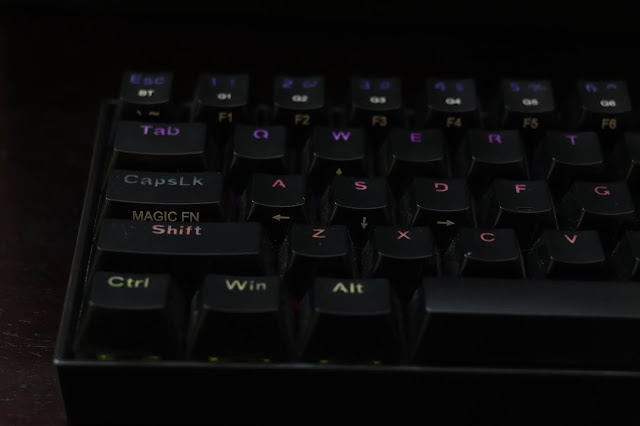
REDRAGON DRACONIC Wireless #K530RGB Mechanical Keyboard @RedragonSA #Draconic #ProductReview
Package
The package is really nice and it contains Redgraon K530 Wireless Keyboard, Switch Puller, Switch Backup box (4 switches with red, black, brown and blue), L Shaped Type-C Charging cable. Most importantly this comes with a nice red dragon sticker which you can put on your laptop or anywhere you love to see it daily. 
REDRAGON DRACONIC Wireless #K530RGB Mechanical Keyboard @RedragonSA #Draconic #ProductReview
This one goes for around R1200 in Johannesburg, South Africa and if you want to lay your hands on the same kindly check all the retailers for this lovely keyboard. I am enjoying looking at this beauty and since the time I have got this my blogging has improved a lot since I like to type on this keyboard. My typing speed seems to be still not that fast as compared with Ali Abdaal but I am working on using all my fingers and type as fast as possible from my ages old hands. The next step will be to have an RGB mouse along with the RGB mousepad to make the whole setup look bright, colourful bringing me back to the same time and again. Thanks, Redragon for making this possible.

Cheers!!!
Support me if you like reading this blog post by buying me a cup of tea or coffee - https://www.buymeacoffee.com/TheLifesWay Contact at thelifesway@gmail.com to collaborate and promote your services and products. Subscribe to my YOUTUBE Channel for giveaways, product reviews and mystery unboxings. #TheLifesWay #9YearsofTheLifesWay. Namaste!

Wednesday, 8 September 2021

@SamsungMobileSA #SmartThings Find Hits 100 Million Find Nodes and New Device Location-Sharing Feature

Hi Friends, 

The fast-growing service is helping users find hundreds of thousands of misplaced devices every day through SmartThings

Samsung Electronics revealed that the SmartThings Find service, which first launched in October 2020, continues to grow rapidly, now comprising more than 100 million find nodes. Powered by SmartThings, the premier technology enabling connected living, around 230,000 devices are located through this feature every day.

“We’re incredibly proud of how quickly the SmartThings Find service has grown in less than a year, helping people all over the world locate hundreds of thousands of misplaced devices every day,” said TM Roh, President and Head of Mobile Communications Business at Samsung Electronics. “SmartThings Find is yet another example of how Samsung is continuing to create meaningful new experiences that help make life more convenient and less stressful.”
@SamsungMobileSA #SmartThings Find Hits New Milestone With 100 Million Find Nodes and New Device Location-Sharing Feature
The fast-growing SmartThings Find service enables users to pinpoint registered Galaxy smartphones, smartwatches, earbuds and even S Pen Pro, as well as personal belongings—like keys or wallets—that have a Galaxy SmartTag or SmartTag+ device attached. SmartThings Find, a standout feature of the SmartThings ecosystem, uses Bluetooth Low Energy (BLE) and ultra-wideband (UWB) technology to locate misplaced devices. Even if the device is offline, other Galaxy users can opt-in to enable their Galaxy smartphone or tablet to help others find nearby lost devices.

SmartThings Find is continuing to evolve with the addition of the newly launched SmartThings Find Members service, which now enables users to invite friends and family to become members of their SmartThings account, so they too can find and manage their devices. Users can now invite up to 19 other people to become members and locate up to 200 devices at once. Once someone has accepted your invitation to SmartThings Find Members, you can opt for them to be able to view your selected devices and locations for specific devices, all upon your consent.

SmartThings Find Members is particularly useful for families, as they try to keep up with pets or keep track of their car keys—even if they don’t have their phone with them.

For more information about the SmartThings app and SmartThings Find service, visit www.smartthings.com/partners/smartthings-find.

About SmartThings
SmartThings is the premier technology enabling connected living and driving the future of IoT. Its open platform already supports thousands of devices across hundreds of brands and offers endless possibilities to innovators and developers seeking seamless connectivity in a vast IoT ecosystem. The company is committed to bringing smart functionality and capabilities everywhere consumers want to be while enhancing the user experience. There are currently millions of people in more than 200 countries accessing SmartThings technology daily to create automation and control facets of their smart homes via the SmartThings App and through a range of Samsung products such as phones, TVs, and digital appliances. SmartThings offers the most flexible amount of protocols, including the new IoT standard, Matter. Launched in 2012, SmartThings is headquartered in Mountain View, CA and is a founding board member of Connectivity Standards Alliance, an organization of hundreds of companies creating, maintaining, and delivering open, global standards for the IoT. For more information, please visit www.smartthings.com.

Cheers!!!
Support me if you like reading this blog post by buying me a cup of tea or coffee - https://www.buymeacoffee.com/TheLifesWay Contact at thelifesway@gmail.com to collaborate and promote your services and products. Subscribe to my YOUTUBE Channel for giveaways, product reviews and mystery unboxings. #TheLifesWay #9YearsofTheLifesWay. Namaste!

The @SamsungSA #SmartMonitor Makes Work, Play And Learning An All-In-One Experience

Hi Friends, 

The way we work, learn and play changed dramatically in 2020. In fact, this year just feels like an extension of last year. Now, remote working, blended learning and even time for extra gaming time is now the norm, as people entertain themselves at home. Samsung’s new Smart Monitor has therefore arrived just in time with a single display packed with all-in-one features for work, learning and entertainment. This is a powerful technology that helps you work more efficiently, learn in a more flexible way and play like the outside world does not exist.

Do it all and make it work for you
With Samsung’s new Smart Monitor, you can now work like a boss with the single display, packed with all-in-one features including powerful mobile and PC connectivity with a display that operates Microsoft Office 365 applications. It’s a complete desktop experience, even without a PC, where you can connect the monitor with Samsung DeX, so those work emails and documents on your smartphone can be seamlessly displayed and worked on – turning work into child’s play. And when you do want to play, it does that well too.
The @SamsungSA #SmartMonitor Makes Work, Play And Learning An All-In-One Experience
The 32-inch M5 model, which supports FHD resolution and the 43-inch M7 model, which supports UHD resolution
Life can be a beautiful game
The Smart Monitor is super productive for work or learning but is transformed into a fun station in an instant. This do-it-all screen has the ability to easily access TV and movie streaming services like YouTube, Netflix, and Apple TV, while it seamlessly supports AirPlay. It operates as a complete entertainment hub powered by an incredible display and amazing built-in speakers. For gamers, it’s a secret weapon. You can now keep your eye on the win with an ultra-widescreen and mega- processing power that takes winning to the next level!

Work or learn from a safe distance
Welcome to the world of the Smart Monitor. This is where the office or class comes to you. You can boost your productivity with Remote Access features. Using the Office 365 suite, you can view and edit documents, and conveniently save them all on the cloud. This super-Smart Monitor also has the acclaimed TUV certification, which means it features technology designed to make viewing more comfortable. Even while at home, you can work remotely on your school desktop. With incredible video chat features, the ability to mirror your smartphone and other awesome connectivity tools, everything you need to do is always just an easy click away. And when you need a break, the Smart Monitor switches to give you that escape you need.

Work, play or learn – with the Samsung Smart Monitor, all the boxes are incredibly well ticked! Find out more here. I am looking forward to trying out the features in these Samsung Smart Monitors as the current one I am using is from Acer KA220HQ which I bought in a sale for only R800 or so some 4 years back when their website was launched in South Africa. 

Cheers!!!
Support me if you like reading this blog post by buying me a cup of tea or coffee - https://www.buymeacoffee.com/TheLifesWay Contact at thelifesway@gmail.com to collaborate and promote your services and products. Subscribe to my YOUTUBE Channel for giveaways, product reviews and mystery unboxings. #TheLifesWay #9YearsofTheLifesWay. Namaste!